 cl_quick
Menu bar app for Mac
A Claude quick chat for your Mac, on ⌥Space
cl_quick is a free menu bar app for Mac, a Claude quick chat. Press ⌥Space over any app and a floating bar opens; your first message turns it into a chat window that stays on every Space until you press Esc. Your own Claude Code sign-in answers, on the profile's account in use, and it counts against that account's limits.
cl_quick is made by n-uf (opens in a new tab) and is not affiliated with Anthropic.
The first release isn't out yet. There is nothing to download so far. What it needs


Press ⌥Space over any app
A chat bar opens over whatever you're doing. cl_quick is a menu bar app with no Dock icon, and it never brings another app forward: whatever you're working in stays in front. ⌥Space is the default; Settings offers four other Space shortcuts, any key with ⌘, ⌃ or ⌥, or none.
A bar opens, ready to type
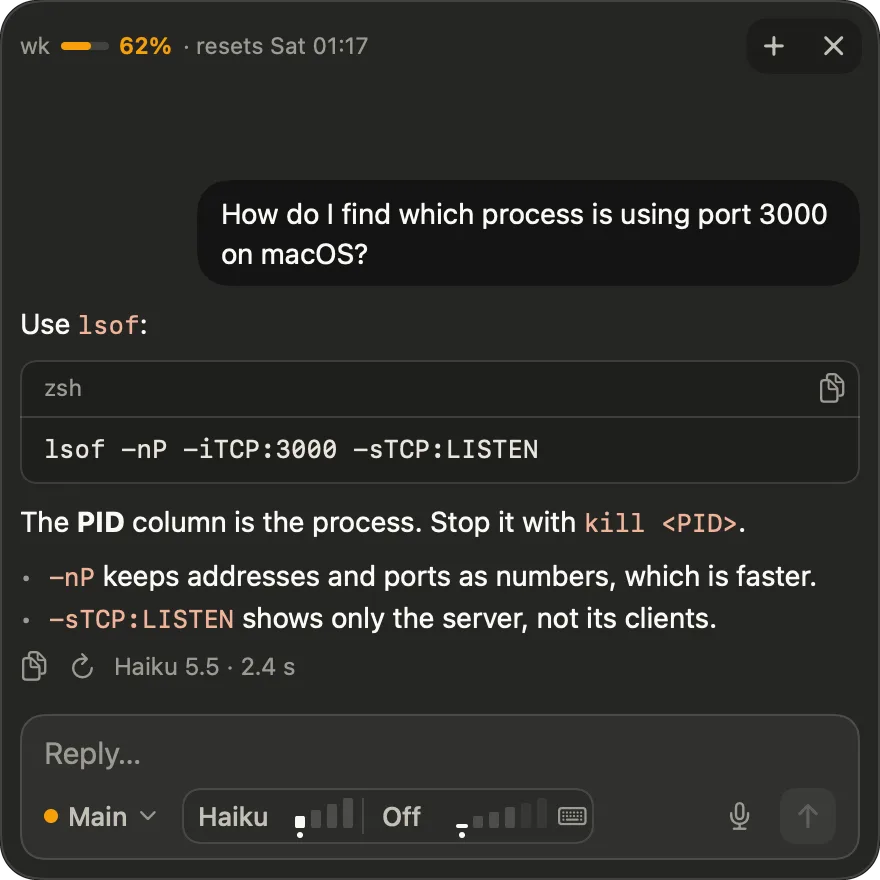
Under the field, in one row, sit the profile (a dot in the colour of its fuller limit, and its name), the model and thinking in one outlined group, a keys button, and at the end the mic and Send. Haiku is the default model and thinking is off. A pick holds for that chat, and a new chat goes back to the defaults.
Type, and press Return
Return sends and Shift-Return adds a line. The mic button, left of Send, starts macOS Dictation into the field, and ⌘D turns it on and off. Paste or drop an image and it shows as a thumbnail over the field. The keys button lists the shortcuts.
The first message makes it a chat window
The bar turns into a chat window that floats on every Space. Answers stream in as Markdown, code blocks have Copy, and each answer says which model gave it and how long it took. Esc or ⌘W hides the window, and ⌘N starts a new chat.
Incognito: nothing saved on this Mac
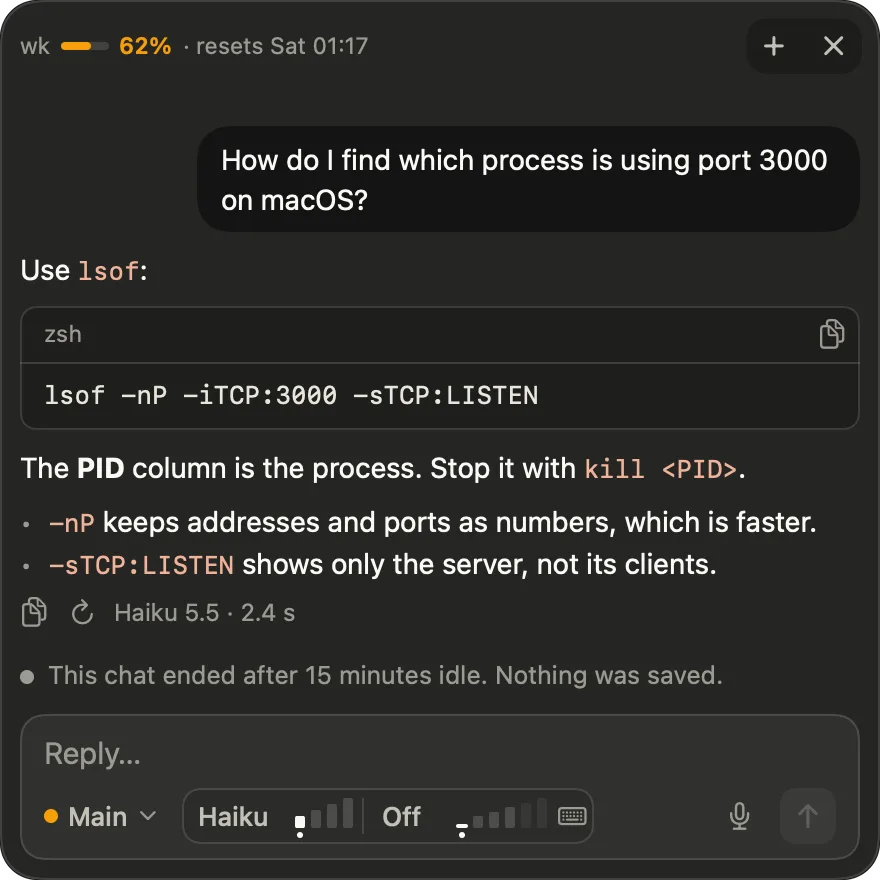
Quick chats are incognito: nothing is saved on this Mac. Your messages still go to Anthropic under the profile's account. A chat ends after 15 minutes idle, and the window says so. What incognito means here
Your limits stay in view
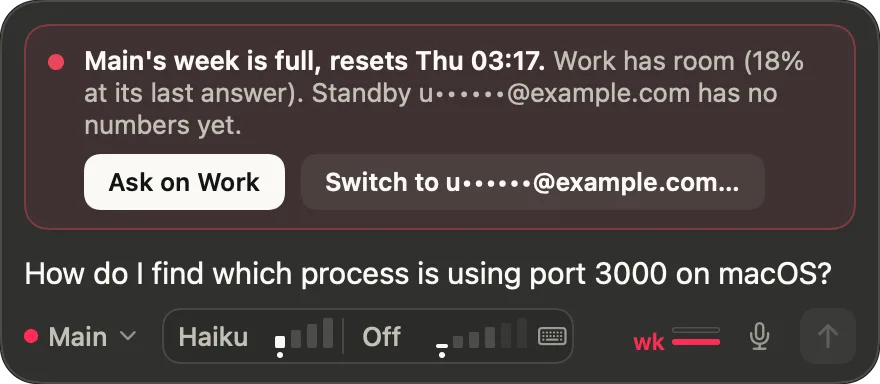
When the 5-hour limit or the week is full, the chat's notice names the window that is full and when it resets, and offers the profile with the most room (Ask on Work). If the profile has a standby account with room, it also offers to switch to it (Switch to …). The bar has a usage indicator, and in the chat window the header shows only the 5h and wk meters, in green, amber from 50%, red from 80% and crimson from 95%. The menu bar menu has a 5-hour and a Week bar for each profile's account in use.
What it is, exactly
cl_quick, one part at a time
Your own Claude Code answers
cl_quick uses your own Claude Code sign-in: your Claude Code answers, on the profile's account in use, and every chat counts against that account's limits. It keeps one claude running while a chat is open and ends it after 15 minutes idle. The app is light, too: it has no Dock icon and is under 5 MB.
It needs an Apple silicon Mac, macOS 13 or later and Claude Code, signed in. Install: what it needs
Profiles, with several accounts each
A profile is a Claude Code folder cl_quick chats on: ~/.claude, a ~/.claude-* folder, or any folder set with CLAUDE_CONFIG_DIR. On its first run cl_quick takes every signed-in one it finds, named after the folder.
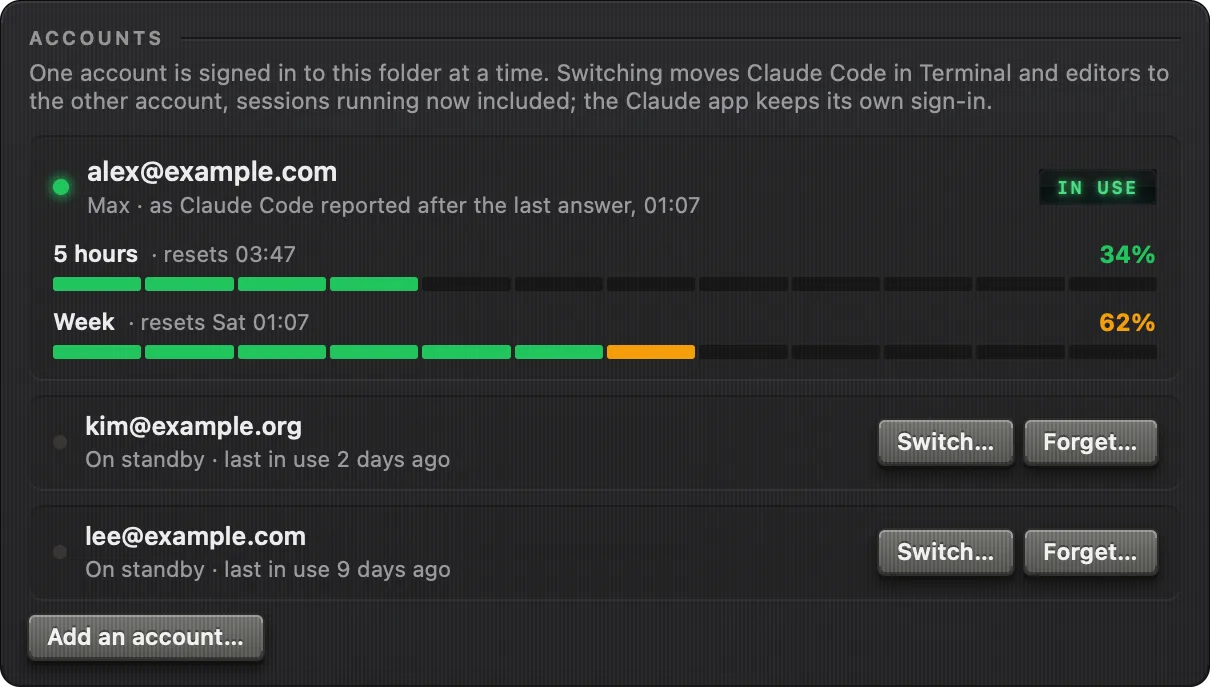
A Claude Code folder holds one signed-in account at a time, so a profile remembers the accounts that have been signed in to its folder: the one signed in now is in use, the others are standby. In the profile's page in Settings each standby account is a row with two buttons, Switch… and Forget…; pressing Switch… asks first, then opens Claude Code's own sign-in in Terminal. cl_quick never sees a password or a token and never touches the Keychain.
The menu bar icon's menu has a block for each profile: its name with a dot in the colour of its fuller limit, the account in use with a green lamp (its address blurred until the pointer is on it), the 5-hour and Week bars with their share and the time to reset, and how old the numbers are. Only the account in use shows usage, and a profile with no numbers yet says "No usage yet". A profile with standby accounts also has Switch account ›. When the numbers are over 5 minutes old, opening the menu asks Claude Code for them again in the background (get_usage only, no message to a model).
Model, thinking, voice and shortcut
The shortcut is ⌥Space by default. Settings ▸ General offers four other Space shortcuts, Other… for any key with ⌘, ⌃ or ⌥, or Off. It warns only about real clashes: a macOS shortcut that uses the key, or a key another app holds when macOS refuses to register it. It needs no Accessibility permission.

There is a second way in. Select text in any app, then right-click ▸ Services ▸ Ask cl_quick. The bar opens with the selection in the field as a quote, ready to edit and not sent, and your question goes under it. macOS hands the selection over, so it needs no Accessibility permission either, and nothing about it is kept. A keyboard shortcut for it can be set in System Settings ▸ Keyboard ▸ Keyboard Shortcuts ▸ Services.
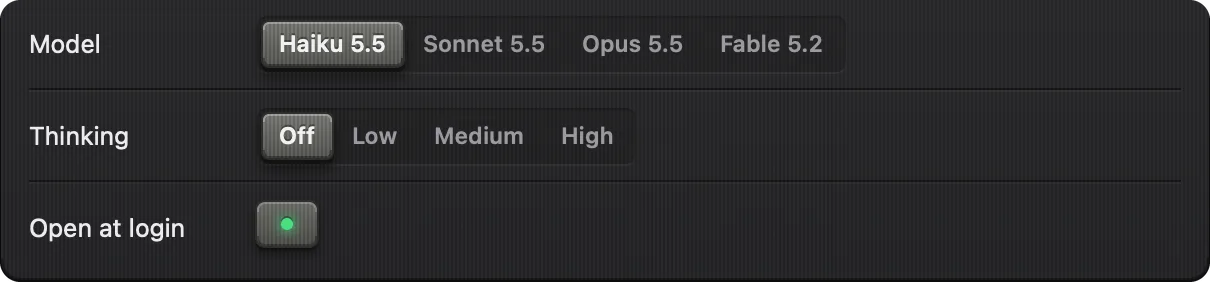
The model is one of four families, Haiku, Sonnet, Opus and Fable, each the newest the account has; a family the account lacks isn't offered. Thinking is off or one of the efforts the chosen model takes (Low, Medium, High, Extra, Max). The pickers change the running claude, so a chat keeps its conversation.
The mic button starts macOS Dictation into the field; cl_quick stays in the background, so Dictation types into the field and not into the app behind it. ⌘D turns Dictation on and off from the keyboard.

Images go in with ⌘V (a screenshot or picture on the clipboard, or image files copied in Finder) or by dropping them on the bar or the chat window. Each shows as a thumbnail over the field with a ✕, up to 5 to a message, and an image alone is a message too. It is scaled down in memory and no file is made for it, so the chat stays incognito.
Incognito chats, said exactly
Nothing is saved on this Mac. Your messages still go to Anthropic under the profile's account. It is not Anthropic's own incognito mode.
A chat lives only in the running Claude Code, which writes no transcript, so it ends with it: after 15 minutes idle, on New chat (⌘N), on another profile or account, if Claude Code crashes, or when cl_quick quits. The window then says "This chat ended after 15 minutes idle. Nothing was saved." and the next message starts a new chat. What cl_quick keeps and sends
Apart from your messages, the one thing cl_quick sends is an update check: about once a day it asks GitHub Releases for its latest release, anonymously, and a newer one shows as "Update available" in the menu bar menu. Nothing is downloaded or installed by the app. Settings ▸ General ▸ Updates turns it off, and then no request is made. What it sends, exactly
The quick chat of cl_audit, as an app of its own
cl_quick is the successor of the quick chat in cl_audit (opens in a new tab). Its settings window wears cl_audit's look, while the chat itself uses Claude's colours. It runs with or without cl_audit and shares nothing with it while running. On its first run it copies cl_audit's old quick chat settings (the shortcut, model and thinking), if there are any.
Questions
What is a Claude quick chat for Mac?
A Claude quick chat is a small chat bar you open over any app with a shortcut. cl_quick is a menu bar app for Mac that does this: press ⌥Space, type, and your own Claude Code answers. The first message turns the bar into a chat window that floats on every Space until you press Esc.
Does cl_quick count against my Claude plan limits?
Yes. The app is free, but every chat runs on your own Claude Code sign-in, so it counts against that account's Claude plan limits. The 5-hour and weekly limits of the account in use stay in view in the chat's header and in the menu bar menu.
Are cl_quick chats incognito?
Yes. Quick chats are incognito: nothing is saved on this Mac. Your messages still go to Anthropic under the profile's account. It is cl_quick's own incognito, not Anthropic's: Claude Code runs with --no-session-persistence, so no transcript is written, and a chat ends after 15 minutes idle.
Does cl_quick work on an Intel Mac?
No. It needs an Apple silicon Mac, macOS 13 or later and Claude Code, signed in. cl_quick chats through that sign-in, on the profile's account in use. The first release isn't out yet, so there is nothing to download so far; the Install page lists what it needs.
How do I open Claude with a keyboard shortcut on Mac?
With cl_quick, press ⌥Space over any app and a chat bar opens, without bringing another app forward. ⌥Space is the default. Settings ▸ General offers four other Space shortcuts, Other… for any key with ⌘, ⌃ or ⌥, or Off. It needs no Accessibility permission.